Kinhold is one hub for tasks, calendar, vault, meals, and rewards, with an AI assistant that creates and answers anything by chat. Your spouse can use it. Your kids will want to.
Free for one family, forever Encrypted vault Bring your own AI key
app.kinhold.app/dashboard
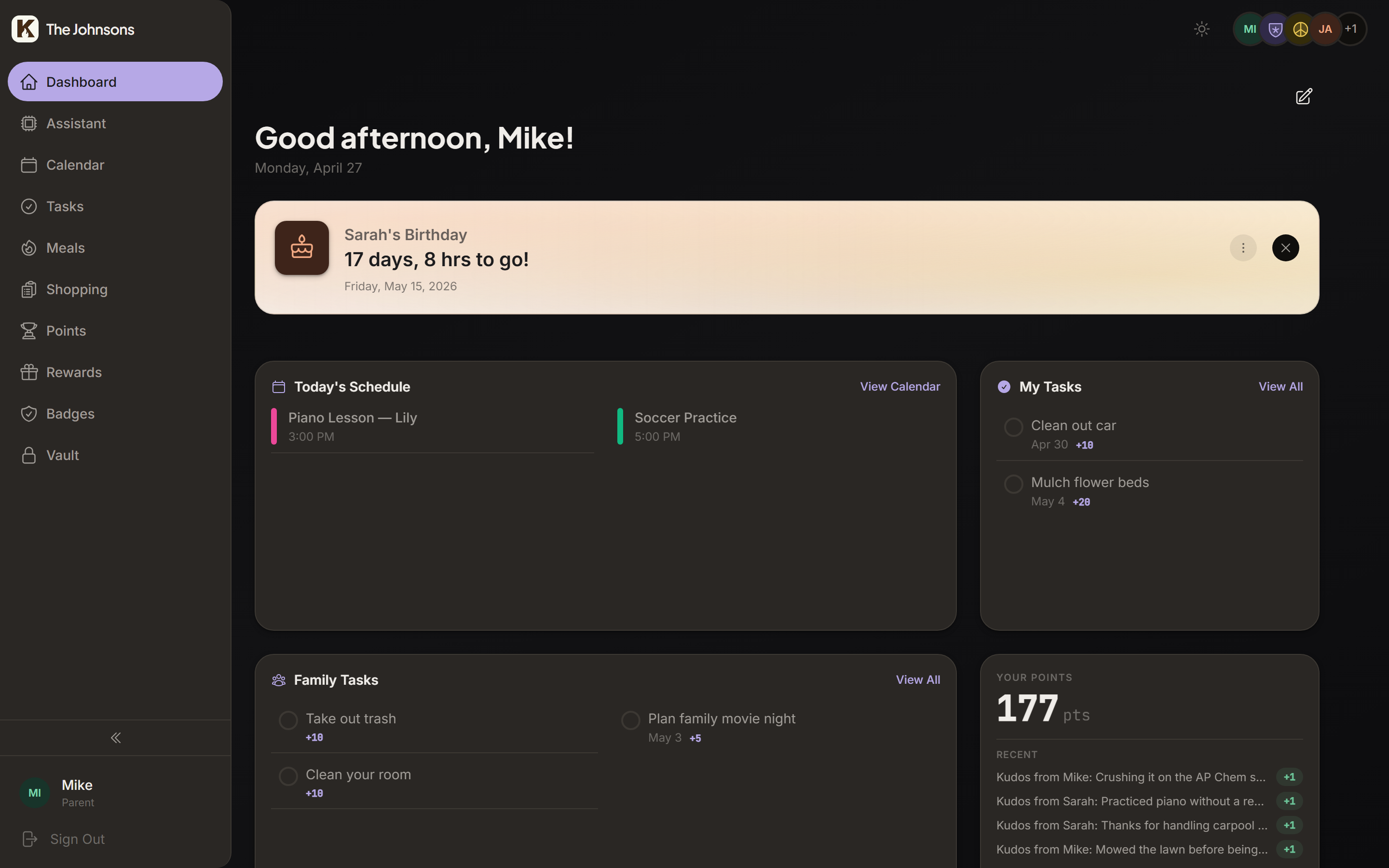
Good morning, Greg
Today's family hub
Today's tasks
4 left
Take out trash+5
Walk the dog+3
Pack lunch for Mia+2
Soccer pickup 5:00pm+5
This week
MMia142
JJack128
LLucy96
Up next
Mia · Soccer practice
Today · 5:00–6:30pm · Lincoln Park
in 3h
Family · Pizza & movie night
Friday · 7:00pm · Living room
Mia unlocked the "Streak ×7" achievement
Stop duct-taping a dozen apps into a family.
Most "family productivity" is twelve disconnected apps and a group chat where things go to die. Kinhold collapses the stack.
To-do app
Shared calendar
Meal planning
Recipe management
Shopping list
Chore charts
Rewards system
Information storage
Just Kinhold.One hub. One login. One source of truth.
AI-first interface
Say it once. Done.
Calendar events, reminders, meal plans, chore assignments, vault lookups — tell the assistant what you need and it handles the rest. If an MCP tool can do it, one sentence is all it takes.
Request
typing…
Add dentist for Mia on Tuesday at 2 pm and remind her Tuesday morning.
Done. Added the dentist to Mia's calendar and set an 8 am reminder.
No forms, menus, or dropdowns
Calendar
Mia
May12
Dentist
2:00 PM · 1 hr
Mia
Event created
Reminders
Mia
Dentist today
Tue May 12 · 8:00 AM
"Don't forget — dentist at 2 pm today!"
Reminder set
Ask anything about your family.
Create, edit, or look things up. Every module in Kinhold is wired into the assistant, so one question can span tasks, calendar, vault, and more.
Kinhold AssistantLive
G
Try: "schedule dentist for Mia next Wednesday at 2"
Use Claude. Or ChatGPT. Or both.
Kinhold ships an MCP server. Connect Claude, ChatGPT, or any client that supports custom MCP servers and manage your family from there.
Built-in assistant too
Don't want to wire up an external client? Kinhold has its own chat baked in, with the same access to your family hub.
Permission-aware
The AI sees exactly what each user is allowed to see. Kids can't peek at the vault.
Everything in one place
A complete operating system for your family.
Eight tightly-integrated modules, all wired into the same dashboard, AI, and permission model.
Drag-and-drop widgets per user. Kids see their leaderboard, achievements, and chore list. Parents see the calendar, the family activity feed, and what needs claiming.
Recurring chores. Family tasks anyone can claim. Points awarded the moment a task is checked off, written to a real ledger so nobody can argue about who did what.
Multiple lists (chores, errands, "honey-do")
Recurring rules (daily, weekly, every other Tuesday)
"Family tasks" anyone can claim for the points
Auto-points on completion. No manual scoring.
Today's tasks
4 left
Take out trash
Today
M+5
Walk the dog
Today
ClaimM+3
+3 pts
Pack lunch for tomorrow
Today
J+2
Practice piano
5:00 PM
L+8
Mulch the flower bedsFamily
This week
Claim+20
Food, end to end
Photo of a recipe → dinner Wednesday → groceries Saturday.
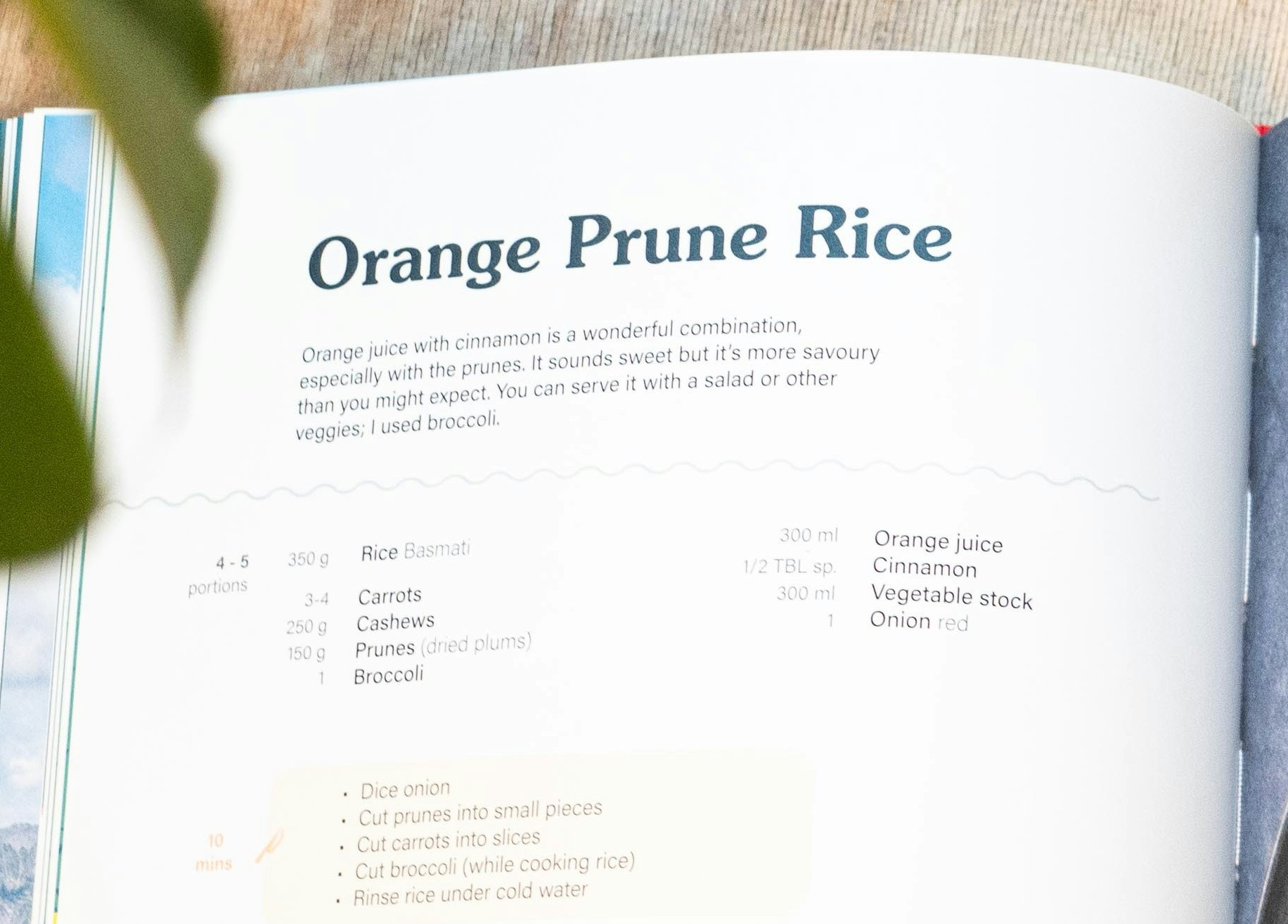
Three modules that work great alone, and even better together. Snap a photo of a recipe (the AI reads it), drop it on a day, and the shopping list builds itself.
Recipes
AI
drop a photo or paste a URL
Reading recipe…
Orange Prune Rice
40m 4
· Basmati · Prunes · Orange · Onion · Saffron +3
From a photo, a URL, or by hand
Meal plan
This week
Mon Sheet-pan salmon
Tue Bean & rice bowls
WedOrange Prune Rice
Thu Pasta night
FriPizza out
Sat Tacos
SunLeftovers
Drag any recipe onto a day
Shopping list
0 items
Basmati rice2 cups
Pitted prunes1 cup
Orange juice1 cup
Yellow onion1
Saffron threadspinch
Auto-built from this week
Recipes
Drop a photo of grandma's index card. Paste a Pinterest URL. Or type it by hand. The AI extracts the title, ingredients, steps, and serving size.
Meal plan
Drag a recipe onto Wednesday. Mark Friday as pizza out. Plan around soccer practice and the in-laws coming over. The week, on one screen.
Shopping list
Auto-built from the meal plan, deduped across recipes (one onion, not five). Hand it to whoever's running to the store. Check off as you go.
Or use any one on its own. Recipes without meal planning. Shopping lists without recipes. Whatever works for your family.
Calendar
All the calendars. None of the back-and-forth.
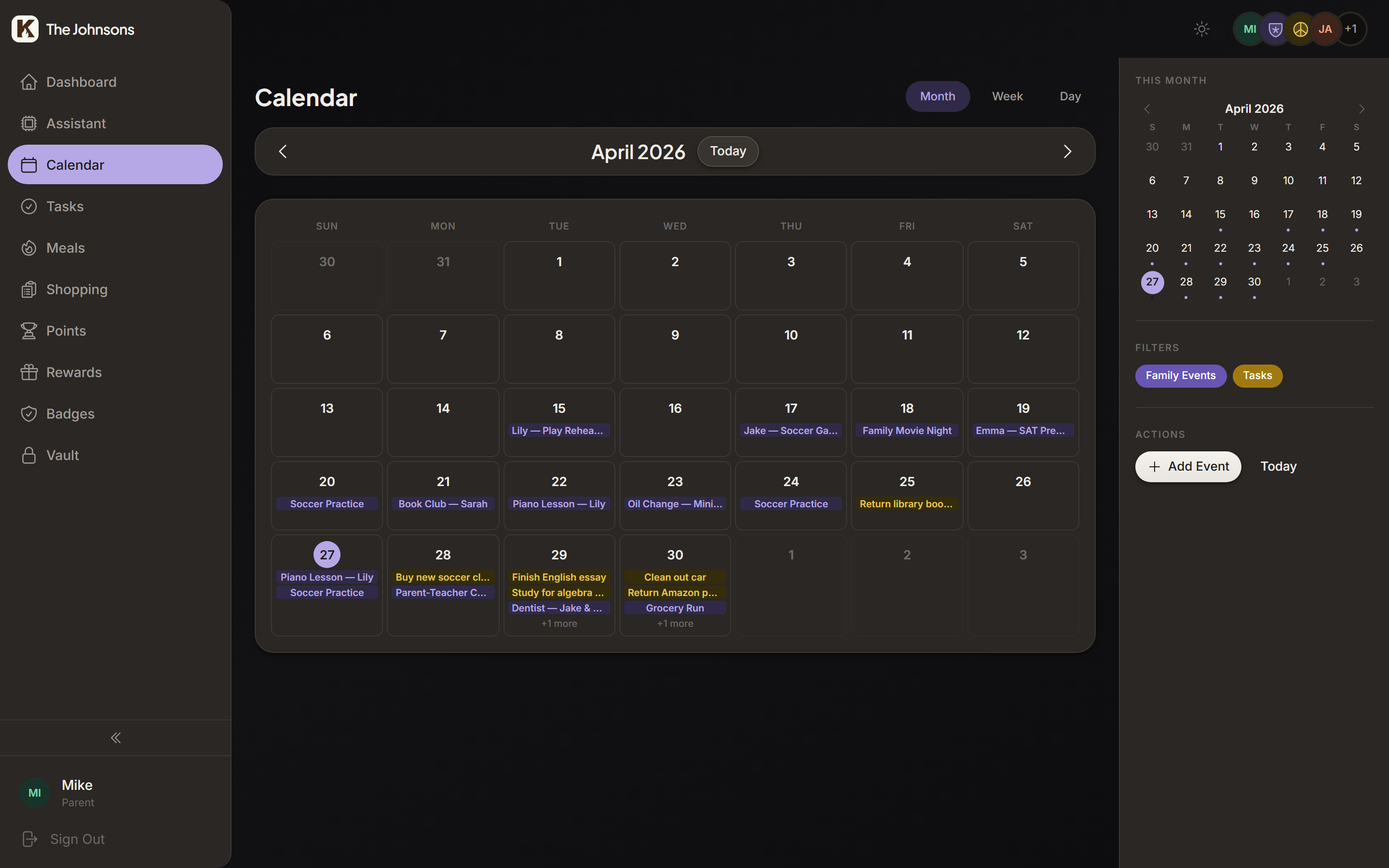
Pull in everyone's Google calendar. Subscribe to school ICS feeds. Add manual events with recurrence and visibility modes: visible to all, marked busy, or fully private.
Google Calendar + ICS feed aggregation
RRULE recurring events with exceptions
Visibility modes: private, busy-only, public
"Feature on dashboard" with countdown banners
Points · Achievements · Rewards
Gamification kids actually like.
Steam-like, not Cocomelon. A real ledger keeps points honest. Achievements unlock automatically. Rewards are whatever your kids actually want, priced in points you set.
Family leaderboard
This week
1M
Mia142
9
2J
Jack128
7
3L
Lucy96
5
4G
Greg71
4
5S
Sarah64
4
Achievements
12 of 27
First Steps
Complete your first task
Task Rookie
Complete 10 tasks
Task Machine
Complete 50 tasks
On Fire
7 days in a row
Rising Star
Earn 100 points
???
Keep going to reveal
Rewards store
177 pts
Extra Screen Time
30 minutes
20 pts
Purchased!
Pick Dinner
Choose tonight
30 pts
Purchased!
Movie Night Pick
You choose
40 pts
Purchased!
Stay Up Late
+1 hour
75 pts
Purchased!
Friend Sleepover
Invite a friend
100 pts
Purchased!
Weekend Trip Pick
Auction
Choose where the family goes Saturday
Top bid45 pts
MJL
Mia leads2d left
Parents set the prices. Kids buy with points (or outbid each other).
Hexagonal, auto-unlocking, with hidden "???" slots to discover.
Real rewards
Screen time, picking dinner, cash payouts. You set the prices.
Custom achievements
Make your own. "Practice piano 30 days." "Read 5 books." Your call.
Vault
The "important documents" folder, finally not a sketchy spreadsheet.
SSNs, medical records, insurance cards, passwords, the wifi password your in-laws keep asking for. Encrypted at rest. Tap to reveal. Auto-clear clipboard. AI playbooks walk you through entering anything you've never bothered to digitize.
AES-256 encryption with separate vault key
Role + per-item permissions (kids never see SSNs)
Markdown editor with document upload
AI-guided playbooks for SSNs, medical, insurance
Sarah's Insurance
Encrypted
Provider
Blue Cross of Iowa
Member ID
XJ-44820-1198
SSN
tap to reveal · auto-clears in 10s
Visible to
GS
Setup
Set up your family in under three minutes.
A five-step wizard, not a configuration manual. Name the family, invite a co-parent, add your kids (no email needed for managed accounts), pick the modules you want, and you're done.
Five guided steps with sensible defaults
Managed kid accounts: no email, no separate login
Toggle modules on or off per family
Roles: parent, kid, guest. Permissions follow.
Get your family set up
~3 min
1
Family
2
Co-parent
3
Kids
4
Features
5
Done
|
You can change this anytime in settings.
sarah@johnson.family
Invitation sent to Sarah
M
Mia
age 14
J
Jack
age 12
L
Lucy
age 9
Managed accounts. No emails needed.
Tasks
Calendar
Gamification
Meal planning
Vault
AI assistant
You're all set.
Welcome to the Johnson family hub.
Self-hosted
Your server, your data. Docker or Upsun.
Encrypted at rest
Vault items use a separate encryption key.
Export anytime
It's your data. Take it with you whenever.
Transparent pricing
No tiers. No upsells. No mystery.
Self-host is fully free for one family. Or pay us to host it, and we'll show you exactly what you're paying for.
Hosted pricing is a placeholder while we finalize numbers. Self-host pricing is final: $0.
For the nerds
Boring, proven stack. Boring is good.
Built on the things you'd already deploy: Laravel, Vue, Postgres, Redis. No experimental runtime, no node-only edge function only-runs-on-Tuesdays nonsense. Should run for a decade.
Same category logic as a CMS or LMS. A CMS organizes content. An LMS organizes learning. A Family Management System organizes the operational chaos of running a household: schedules, tasks, important documents, meals, motivation for the kids. One hub instead of a dozen apps.
Can my non-technical spouse actually use it?
That's the whole point of the AI assistant. If your spouse can text, they can drive Kinhold. "Add a dentist appointment for Mia next Wednesday at 2" creates the calendar event. No menus to learn.
Is it safe for kids?
Yes. Kid accounts are managed accounts (no email required), see only what their role permits, and never have access to the vault. The gamification was designed to feel like Steam, not a sticker chart.
Do I really need to know Docker to self-host?
If you've ever run docker compose up, you're set. If you haven't, the Upsun deploy template is one click. There's also a setup-simple.sh for SQLite-based home installs.
What is MCP and why do I care?
Model Context Protocol is an open standard that lets AI clients call your app's tools. Kinhold ships an MCP server, so you can manage your family from Claude, ChatGPT, or any other client that supports custom MCP server connections. Bring your own assistant.
Can I export my data?
Always. It's your data. Standard exports for tasks, calendar (ICS), and vault (encrypted JSON). No lock-in.
Is the hosted version different from self-host?
Same code. Same features. Hosted just means we run the server, handle updates, and back up your data. You can switch from one to the other and bring your data with you.
What does "free for one family" actually mean?
Self-hosted Kinhold is free for a single household: your spouse, your kids, your in-laws if they're in the family group. We're not policing that. The license prevents reselling Kinhold as a multi-tenant SaaS, which protects the project and the hosted version.
Your family's operating system, ready when you are.
Try the live demo, or self-host it on the Pi sitting in your office gathering dust.